Contenido
Piénsalo, perder el código de acceso de tu iPhone es lo último que deseas, por supuesto, pero ¿qué pasa si tienes un dispositivo lleno de fotos importantes, mensajes, los contactos de tus seres queridos, etc.? La sola idea te hace sentir impotente y desesperado. Cuando llega el momento de restablecer su iPhone bloqueado, los usuarios suelen querer saber si pueden respaldar un iPhone bloqueado para no perder todos sus datos. De hecho, hay ciertos casos en los que no necesariamente perderá sus datos. Dependiendo de su configuración anterior y el estado del dispositivo, hay maneras de ayudarle a proteger sus archivos antes de realizar un restablecimiento. Si su iPhone no está bloqueado y desea hacer una copia de seguridad de sus datos normalmente, siga los pasos en “Realiza una copia de seguridad de los contactos del iPhone en el PC.Sigue leyendo para descubrir qué puedes y qué no puedes hacer cuando tu iPhone está bloqueado y cómo evitar la pérdida permanente de datos.

Si tu iPhone está bloqueado y te preocupa perder archivos importantes, hacer una copia de seguridad de tus datos debería ser tu primer paso antes de restablecer el dispositivo. En algunos casos, especialmente si tu iPhone estaba previamente conectado y era de confianza en una computadora, aún podrías crear una copia de seguridad. Si te preguntas cómo hacer una copia de seguridad de un iPhone bloqueado de forma rápida y segura, Copia de seguridad y restauración de datos de Aiseesoft iOS Proporciona una solución sencilla y segura.
105,489 Descarga
 100% Seguro. Sin anuncios.
100% Seguro. Sin anuncios.
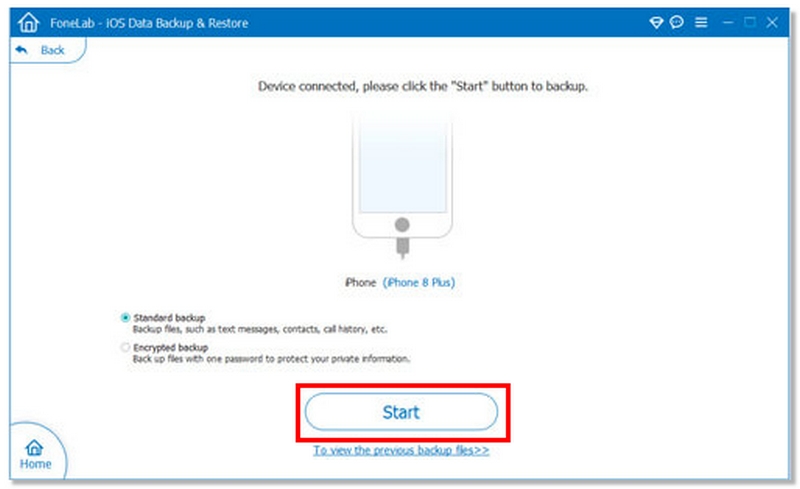
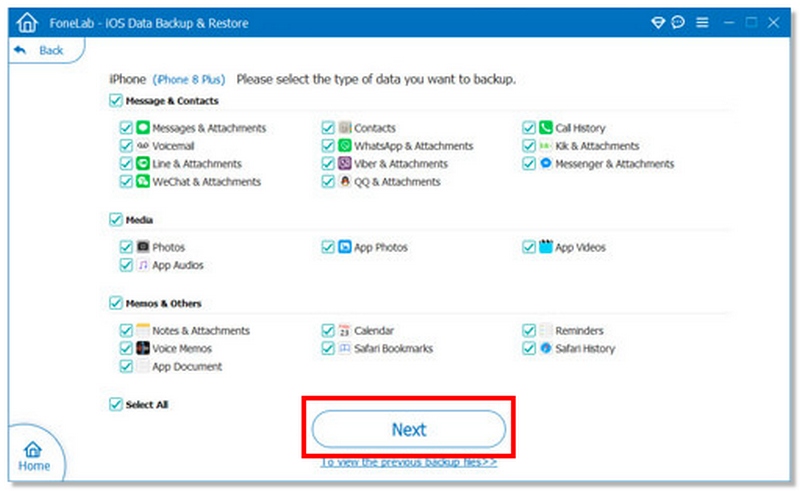
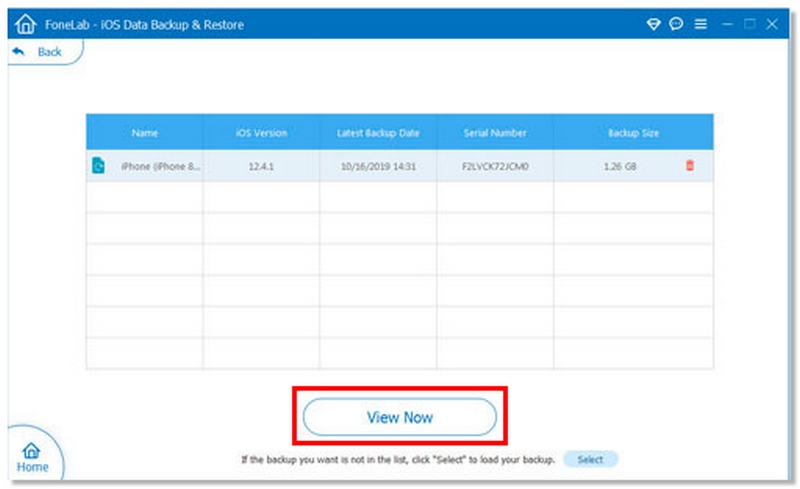
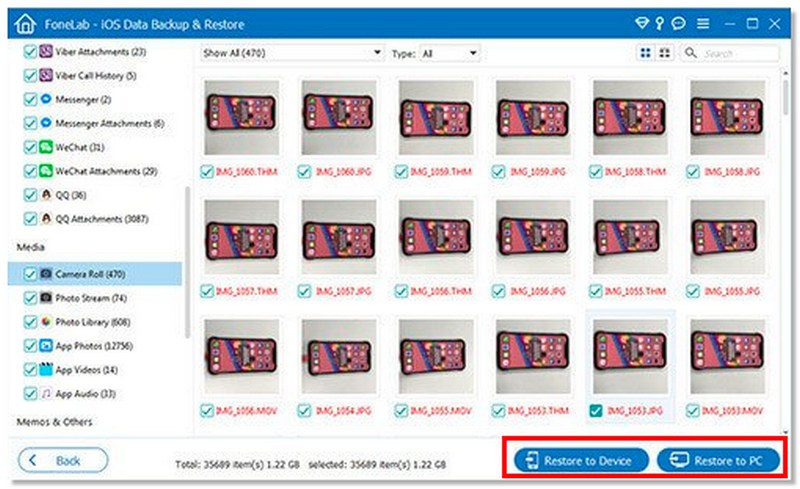
| Categoría: | Tipos de datos compatibles |
| Contactos y comunicación | Contactos, Mensajes (SMS/iMessage), WhatsApp, Historial de llamadas |
| Notas y productividad | Notas, recordatorios, calendario, marcadores de safari, historia del safari |
| App Date | Archivos adjuntos de WhatsApp, Archivos adjuntos de mensajes, Fotos de la aplicación, Vídeos de la aplicación, Documentos de la aplicación |
| Archivos multimedia | Carrete de la cámara, Biblioteca de fotos, Álbum de fotos, Vídeos, Notas de voz |
| Archivos adjuntos | Buzón de voz, archivos adjuntos de mensajes, archivos adjuntos de WhatsApp |
| Otros datos | Datos de Safari, Documentos de la aplicación, Archivos multimedia de la aplicación |
Si previamente sincronizaste tu iPhone con una computadora, aún puedes hacer una copia de seguridad con iTunes aunque el dispositivo esté bloqueado. Sin embargo, este método solo funciona si el iPhone ya era de confianza en esa computadora. De lo contrario, iTunes te pedirá que desbloquees el dispositivo primero.
Para usuarios de Windows y versiones anteriores de macOS, la copia de seguridad se realiza a través de iTunes. En macOS Catalina y versiones posteriores, Apple reemplazó iTunes por Finder, pero el proceso es muy similar.
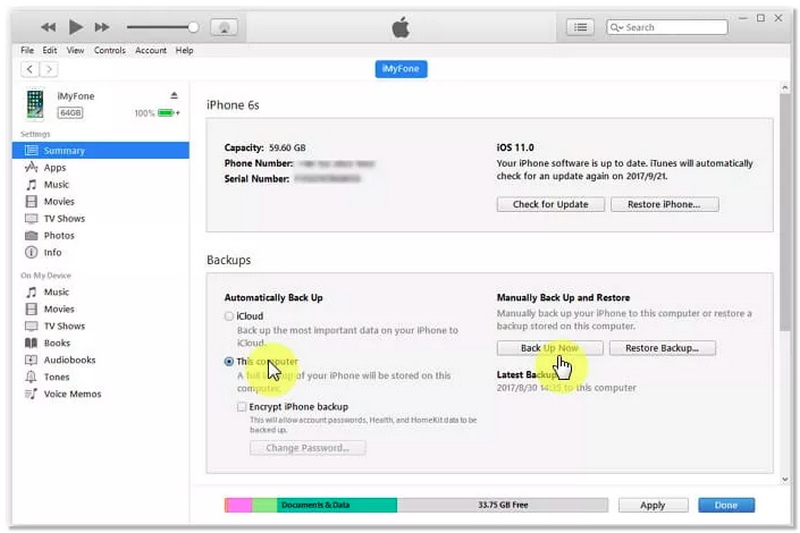
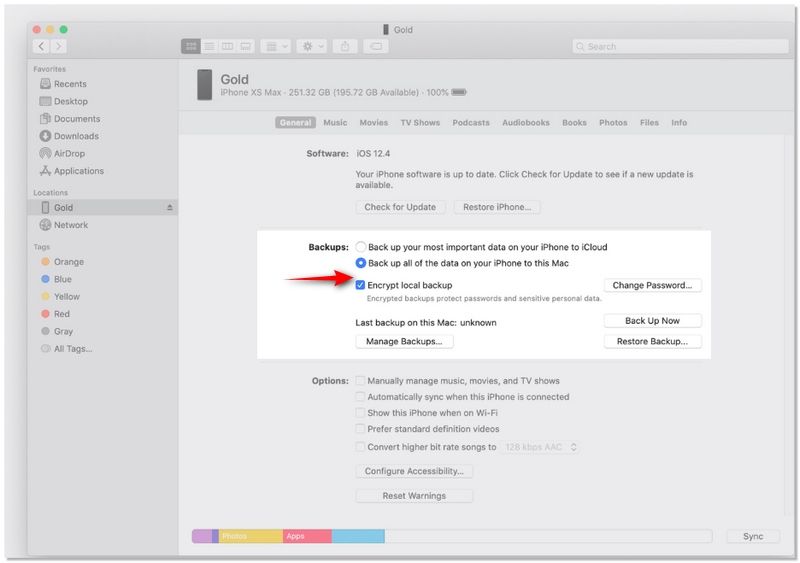
• Este método solo funciona si el iPhone había sido previamente autorizado en ese ordenador.
• Si nunca confiaste en la computadora, primero debes desbloquear el iPhone, lo cual puede no ser posible si olvidaste el código de acceso.
• Si iTunes o Finder no pueden detectar el dispositivo, considere utilizar la herramienta Aiseesoft iOS Data Backup and Restore.
100% Seguro. Sin anuncios.
100% Seguro. Sin anuncios.
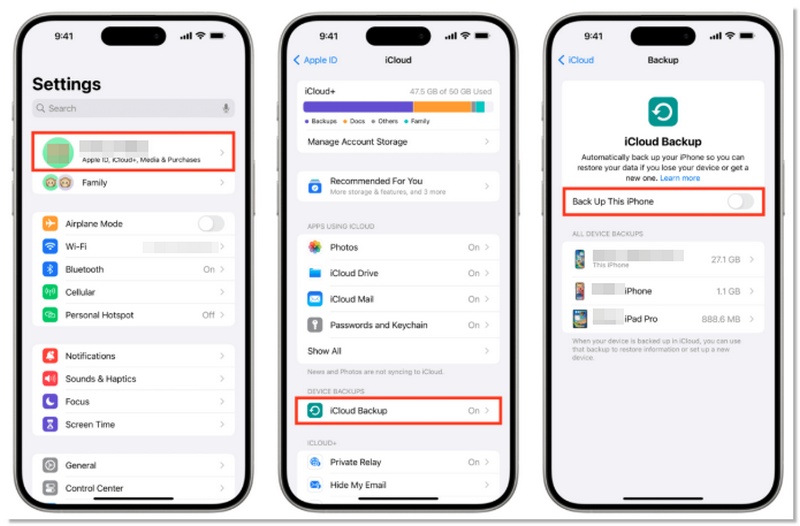
Realizar una copia de seguridad de su iPhone Es fundamental, sobre todo si tu dispositivo está bloqueado y quieres guardar tus datos antes de continuar. Por suerte, si tu iPhone está vinculado a tu ID de Apple y tienes activada la copia de seguridad de iCloud, puedes guardar tus datos sin desbloquearlo. Este método garantiza que tus fotos, contactos, mensajes y datos de las apps permanezcan a salvo.
Nota: Algunos iPhones bloqueados pueden requerir que introduzcas el código de acceso para realizar una copia de seguridad manual.
¿Se puede desbloquear un iPhone deshabilitado?
No. No puedes desbloquear un iPhone deshabilitado. Pero puede usar Finder, iTunes, iCloud o el modo de recuperación para borrar su iPhone. Luego recupere los datos de su iPhone con una copia de seguridad de iTunes o una copia de seguridad de iCloud.
¿Puedo reiniciar mi iPhone mientras está deshabilitado?
Sí. Puede usar iTunes para restablecer un iPhone deshabilitado y restaurar los datos de una copia de seguridad reciente. O puede restablecer el iPhone deshabilitado desde la página web Find My iPhone de Apple.
¿Cómo veo si mi iPhone está desbloqueado?
Puedes ir a Ajustes > Datos móviles > Datos móviles. Si hay una opción para Opciones de datos móviles, entonces su iPhone probablemente esté desbloqueado.
Conclusión
Lidiar con un iPhone bloqueado puede ser estresante, pero ahora ya lo sabes. Cómo hacer una copia de seguridad de un iPhone bloqueado De forma segura. En mi experiencia, Aiseesoft iOS Data Backup and Restore es el método más sencillo y fiable. iTunes funciona bien si ya has sincronizado tus datos, e iCloud puede hacer copias de seguridad automáticamente si está activado. Independientemente del método que elijas, lo más importante es proteger tu información confidencial antes de intentar desbloquear el dispositivo.
 ¿Olvidó el código de acceso del iPhone? Cómo desbloquear el código de acceso de iPhone
¿Qué hacer cuando olvidas la contraseña del iPhone? Lee este artículo y descubre cuatro métodos sencillos para desbloquear un iPhone 16/15/14/13/12/11/XS/XR/X/8/7/6 bloqueado o deshabilitado.
 7 maneras de desbloquear un iPhone sin contraseña (2025 funciona) - 100% de éxito
¿Se te ha bloqueado el acceso a tu iPhone o has olvidado tu contraseña? Probamos 7 maneras de desbloquear tu iPhone sin contraseña en 2025. Compara las tasas de éxito, la velocidad, la pérdida de datos y las mejores opciones.
 ¿Cómo quitar la ID de Apple del iPhone? Compruebe 4 métodos aquí
¿Quiere eliminar la ID de Apple de un iPhone robado o bloqueado? Lea esta publicación para eliminar su cuenta de ID de Apple en iPhone o iPad sin contraseña.
Respaldar datos de iPhone
Copia de seguridad de mensajes de texto de iPhoneFotos de respaldo de iPhoneContactos de respaldo de iPhoneCopia de seguridad de la música del iPhoneCopia de seguridad de mensajes de WhatsApp para iPhoneCopia de seguridad de notas de voz de iPhoneCopia de seguridad de los datos del iPhone antes de la actualizaciónSu mejor opción para realizar copias de seguridad de datos desde iPhone/iPad/iPod a Windows/Mac y restaurar desde la copia de seguridad de datos de iOS a un dispositivo/computadora iOS de manera segura y eficiente.
100% Seguro. Sin anuncios.
100% Seguro. Sin anuncios.

*Campo requerido
*Por favor ingrese un correo electrónico válido