Desbloqueo iPhone Aiseesoft
 100% Seguro. Sin anuncios.
100% Seguro. Sin anuncios.
Contenido
¿Puede usted eliminar Buscar mi iPhone sin contraseñaEn la era actual, centrada en los smartphones, los iPhones se han convertido en una herramienta indispensable en nuestra vida diaria, con funciones que brindan comodidad y seguridad. Una de ellas es Buscar mi iPhone, que protege nuestros teléfonos permitiéndonos encontrarlos y bloquearlos remotamente. Pero ¿qué pasa si se bloquea tu iPhone y no puedes desactivarlo porque no recuerdas la contraseña? Nuestra publicación explora métodos eficientes para desactivar Buscar mi iPhone sin la contraseña en situaciones reales, para que puedas volver a tener el control de tu teléfono de forma eficiente y segura. Presentaremos cuatro soluciones para borrarlo definitivamente: borrar la cuenta de iCloud, omitir el DNS de iCloud, eliminar la cuenta de iCloud y contactar con el soporte técnico de Apple.
The most reliable way to force turn off Find My iPhone without a password in 2026 is by using dedicated unlocking software on a computer. Because Apple has patched all on-device bypass bugs in recent iOS updates, a desktop tool is required to securely wipe the Apple ID from the device.
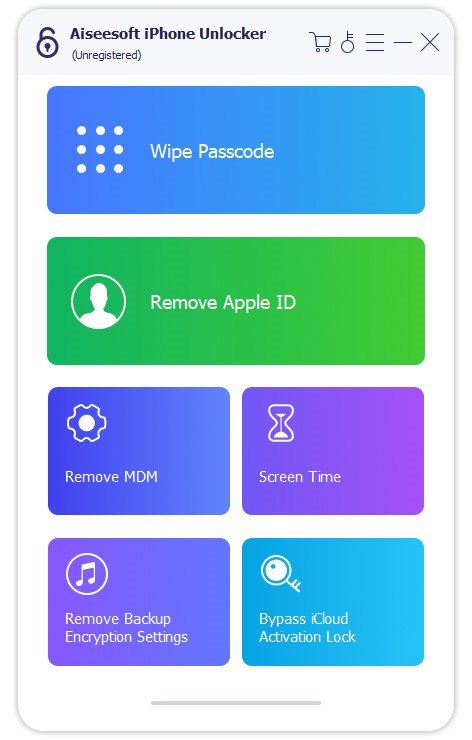
Desbloqueo iPhone Aiseesoft is an industry-leading tool capable of removing the Apple ID, bypassing Activation Lock, and wiping the Screen Time passcode. It doesn’t require any complex steps or professional tools, but a computer and a USB cable are needed.
100% Seguro. Sin anuncios.
100% Seguro. Sin anuncios.
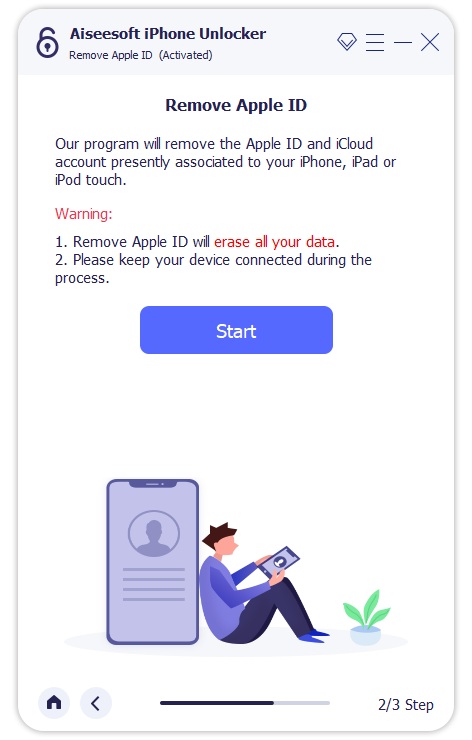
Nota: Removing the Apple ID on devices running iOS 11.4 and later with Find My enabled will erase all data and settings, resetting the iPhone to factory defaults.
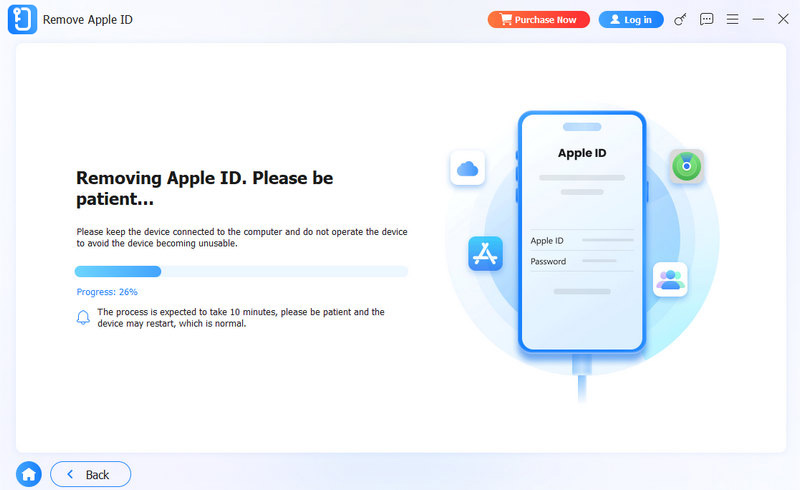
Steps to Remove Apple ID and Find My iPhone with Aiseesoft iPhone Unlocker:
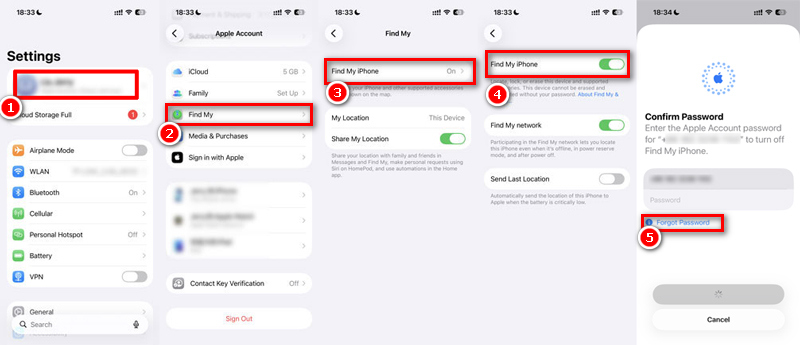
You can directly turn off Find My iPhone in Setting with an Apple ID password. If you can enter the iPhone but can not remember the Apple ID password, the best way it to reset during setting.
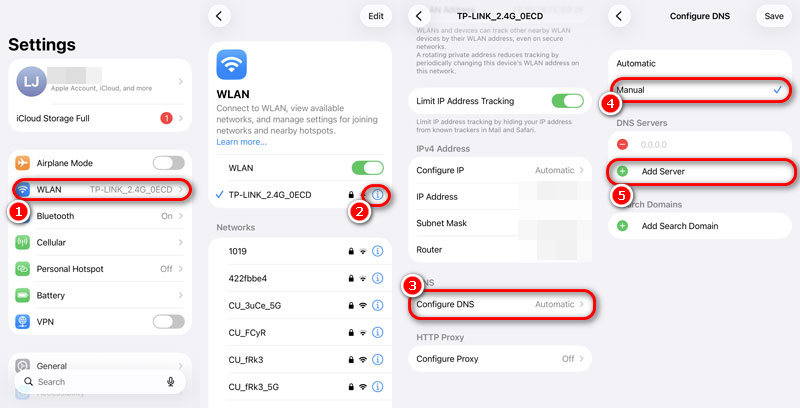
Another way to disable Find My iPhone is to modify your DNS. Bypass iCloud DNS directs your device's activation request to a specific DNS server. This impersonates your device as being unlocked.
Note: This does not permanently turn off Find My iPhone from Apple's servers. It temporarily redirects your connection to a third-party server, allowing you to use basic web-based apps and features on the phone.
A visit to Apple Support can be an option in the event of issues with disabling the Find My iPhone without a password.
Carrying the proof of purchase and appropriate device credentials with them, Apple's authorized team can offer custom recommendations and solutions. Such an official solution will maintain your respect for Apple's security standards while resolving the issue of an activation lock. These experts review your case and can offer workable solutions with respect for your privacy and data integrity. This may take some waiting time and patience, but this works as an efficient solution.
Will turning off Find My iPhone delete my data?
Simply toggling the Encontrar mi switch off inside your Settings app (if you know the password) does not delete any data. However, if you do not know the password and must use third-party software like Aiseesoft iPhone Unlocker or an Apple Support request to force-remove the Apple ID, your iPhone will be factory reset, resulting in total data loss.
¿El modo avión desactiva Buscar mi iPhone?
No. Airplane mode only pauses location updates. While Find My utilizes GPS to receive location coordinates, it requires an active internet connection (or proximity to other Apple devices via the Bluetooth Find My network) to transmit that data to Apple's servers. Turning on Airplane mode hides your current location, but Find My remains active on the device.
Can I turn off Find My iPhone from iCloud.com?
Yes, but only if you have the Apple ID and password. If you bought a used phone, you can ask the previous owner to log into iCloud.com, go to Find Devices, select the iPhone, and click Remove from Account. This will instantly turn off Find My iPhone without requiring a password on your end.
Conclusión
While Apple makes it difficult to desactivar Buscar mi iPhone sin contraseña, you still have a few reliable options. You can reset the password first. If you have the original receipt, contacting Apple Support is your best official route. For a quick, temporary fix, the DNS bypass works well.
However, if you want a fast and permanent solution for modern devices, Desbloqueo iPhone Aiseesoft is the clear winner. Don't waste your time on outdated "bug" tricks from older iOS versions that no longer work. Download Aiseesoft to safely remove the Apple ID and regain full control of your iPhone in just a few clicks.
 Cómo desactivar Buscar mi iPhone y el bloqueo de activación
¿Quieres desactivar el molesto Find My iPhone? Puede leer este artículo y encontrar la mejor manera de deshabilitar Buscar mi iPhone/iPad/iPod.
 Cómo cerrar sesión en Find My iPhone: 3 formas para móviles y ordenadores
¿Quiere cerrar sesión en Find My iPhone para evitar que otros accedan a su antigua cuenta de Apple? Presentaremos los tres métodos principales para cerrar sesión en Find My iPhone.
 Formas prácticas de desactivar el servicio de ubicación en iPhone y iPad
Para desactivar la ubicación en el iPhone para proteger la privacidad u otros fines, puede leer nuestra guía completa y seguir los pasos para obtenerla correctamente.
Consejos para desbloquear iOS
Desbloquear la pantalla de iOS
Omitir el bloqueo de activación de iOS
Recuperar datos de iOS

Para reparar la pantalla del iPhone bloqueada, la función de borrado de contraseña puede ayudarlo mucho. Y también puede borrar fácilmente la ID de Apple o la contraseña de Screen Time.
100% Seguro. Sin anuncios.
100% Seguro. Sin anuncios.

*Campo requerido
*Por favor ingrese un correo electrónico válido