Contenido
Una pantalla rota en un teléfono Samsung puede convertirse rápidamente en una pesadilla, especialmente cuando la pantalla se queda completamente negra y todos tus datos importantes se vuelven inaccesibles. Muchos usuarios de Samsung se han enfrentado a esta frustrante situación después de accidentes o daños repentinos, solo para darse cuenta de que fotos, contactos, mensajes y otros archivos valiosos están atrapados dentro del dispositivo. Situaciones como estas pueden ser frustrantes, especialmente cuando recuperar datos personales es más difícil que cambiar el hardware o comprar un teléfono nuevo. Sin embargo, una pantalla rota que no te permite acceder a tu dispositivo no implica necesariamente que tus datos se hayan perdido para siempre. En este tutorial, pretendemos ayudarte a comprender varias formas confiables a través de las cuales puedes realizar Recuperación de datos de pantallas rotas de SamsungDe esta forma, podrá recuperar los datos que considere esenciales incluso cuando el dispositivo esté fuera de uso.
| Herramienta/Método | Ideal Para | Requiere copia de seguridad | Riesgo de pérdida de datos | Dificultad | Compatible con Android / Samsung |
| Recuperación de datos gratuita de Android de Aiseesoft | Pantalla negra, pantalla rota, el táctil no responde. | No | No (recuperación de solo lectura) | Fácil | Android 10–14, Galaxy S21–S24, serie A, serie Note |
| Ratón USB (conector USB OTG) | La pantalla es visible, pero la función táctil no funciona. | No | No | Fácil | Android 8–14 (modelos compatibles con OTG) |
| Duplicación de pantalla (TV/monitor mediante HDMI o Smart View) | Visibilidad parcial de la pantalla | No | No | Media | Android 9–14 (dispositivos compatibles con Smart View) |
| Restauración de copia de seguridad de Google | Dispositivo inaccesible, pero la copia de seguridad de Google está habilitada. | Sí | No | Fácil | Androide 10–14 |
| Samsung Cloud Backup | Copia de seguridad de la cuenta de Samsung disponible | Sí | No | Fácil | Una interfaz de usuario 4–6 (series Galaxy S, A, Z) |
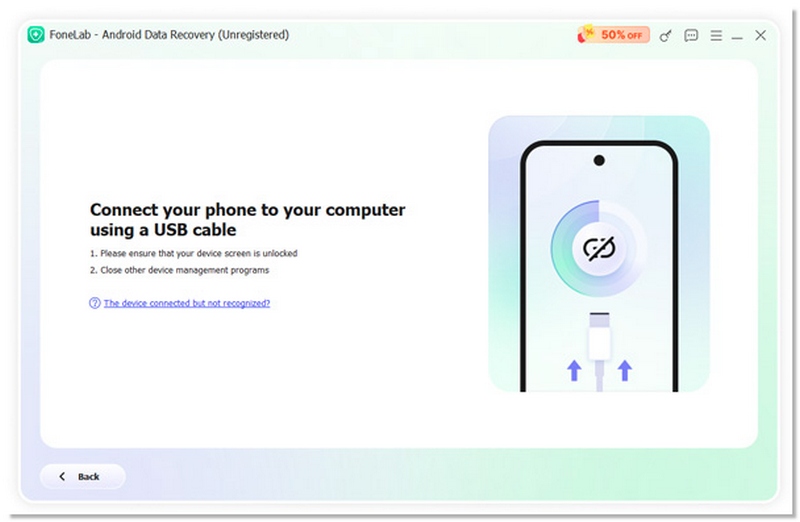
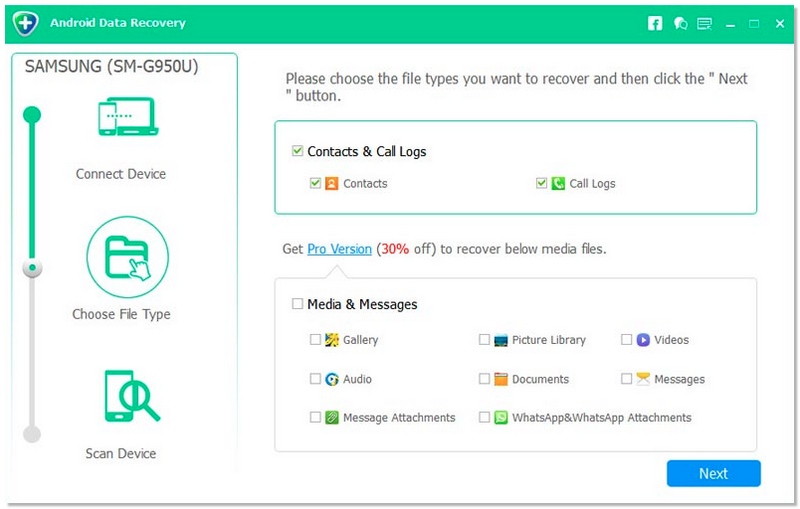
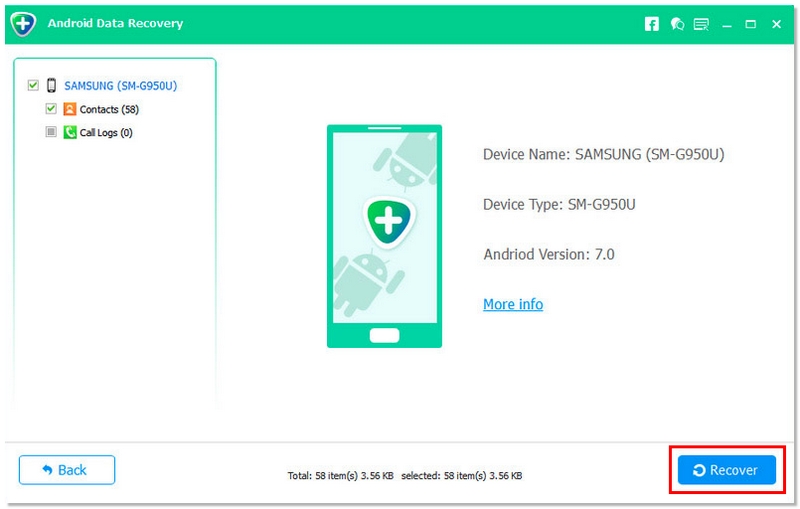
Cuando la pantalla de tu Samsung está rota o completamente negra, acceder a tus datos directamente desde el teléfono se vuelve casi imposible. En lugar de reemplazar la pantalla de inmediato, puedes usar Recuperación de datos gratuita de Android de Aiseesoft Para extraer archivos importantes de forma segura. Esta herramienta está diseñada para la recuperación de datos de dispositivos Samsung dañados, permitiéndote recuperar contactos, mensajes, fotos y más, incluso cuando la pantalla táctil no responde. Es compatible con dispositivos Samsung modernos, incluyendo Galaxy S21–S24, serie A, serie Note y dispositivos con Android 10–14 / One UI 4–6.
115,011 Descarga
Recuperación de datos gratuita de Android de Aiseesoft
 100% Seguro. Sin anuncios.
100% Seguro. Sin anuncios.
Pasos para recuperar datos de una pantalla Samsung rota
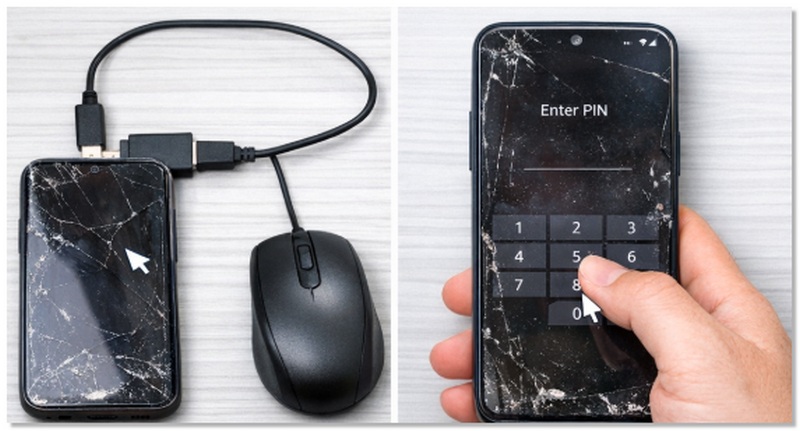
Si la pantalla de tu Samsung está rota pero aún muestra contenido y la función táctil no funciona, puedes usar un ratón USB con un adaptador OTG para operar el teléfono y recuperar datos. Esta es una solución práctica para eliminar la contraseña del teléfono Samsung que tiene la pantalla rota cuando el dispositivo se enciende y recupera tus datos.
Ventajas
Desventajas
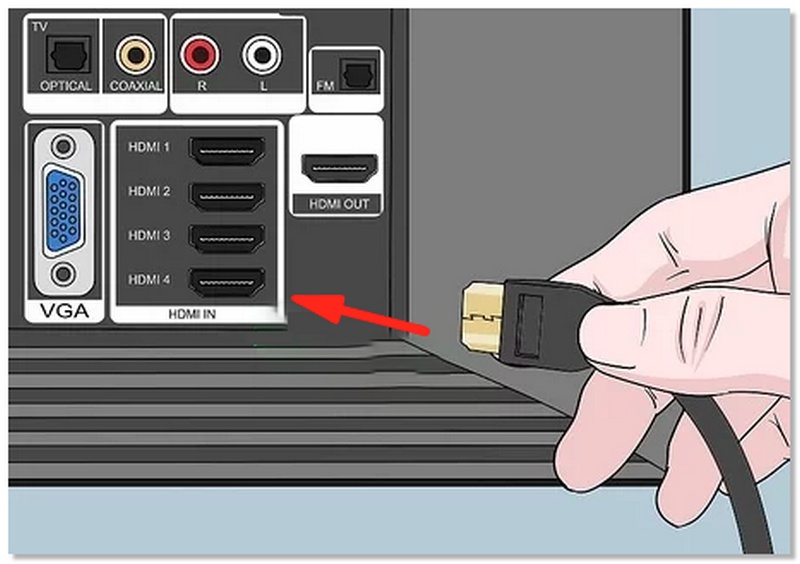
Si la pantalla de tu Samsung está demasiado dañada para usarla, puedes duplicarla en un televisor o monitor para acceder a tus datos. Este método es útil cuando la pantalla está en negro o no responde, pero el teléfono aún funciona. Te permite navegar y copiar archivos sin tocar la pantalla dañada.
Ventajas
Desventajas
Si la pantalla de tu teléfono Samsung está rota, pero activaste previamente la copia de seguridad de Google, puedes restaurar tus contactos, fotos y otros datos en un dispositivo nuevo o después de reparar tu teléfono actual. Este método funciona incluso si la pantalla no funciona, siempre y cuando hayas realizado una copia de seguridad de tus datos.
Ventajas
Desventajas
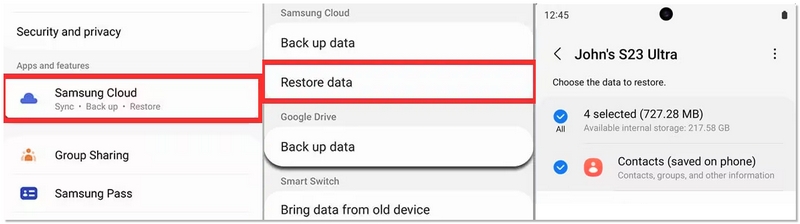
Si previamente habilitaste la copia de seguridad de Samsung Cloud, puedes restaurar tus datos importantes incluso si tu La tableta Samsung no se enciende para su pantalla rota. Este método funciona mejor al cambiar a un nuevo dispositivo Samsung o después de reparar su teléfono actual. Es una solución eficaz para recuperar datos de Samsung en casos de pantalla rota cuando se activó previamente la copia de seguridad en la nube.
Ventajas
Desventajas
¿Será posible recuperar los datos de una pantalla dañada si rooteo mi teléfono Samsung?
No se recomienda rootear el sistema a menos que seas un usuario avanzado. Podría anular la garantía y sobrescribir los datos existentes, lo que dificultaría la recuperación.
¿Puedo recuperar mensajes de WhatsApp o de redes sociales de un teléfono Samsung averiado?
Sí, si las aplicaciones se respaldaron en Google Drive, Samsung Cloud u otros servicios en la nube, puedes restaurar tus chats en otro dispositivo.
¿Puedo recuperar datos de un teléfono Samsung dañado por el agua con la pantalla rota?
Sí, pero el éxito de la recuperación depende de los componentes internos. Puede ser necesario utilizar software de recuperación profesional o reparar el hardware antes de recuperar los archivos.
Conclusión
A través de este artículo, los lectores podrán conocer varios métodos para recuperar información importante de un teléfono Samsung con la pantalla rota. El artículo les ayudará a decidir qué método se adapta mejor a la situación de su dispositivo, si tienen una copia de seguridad y qué tipo de datos desean recuperar. Pueden seleccionar un profesional. Recuperación de datos de Samsung dañada Se puede utilizar una herramienta como un ratón USB OTG, duplicar la pantalla en un monitor o televisor, o recuperar datos de una copia de seguridad en la nube, lo que brinda seguridad y confianza en la forma de guardar contactos, fotos, mensajes y otros archivos. Además, la guía indica que incluso de dispositivos con daños físicos, los datos se pueden recuperar de forma segura y eficiente.
 Samsung Smart Switch: transfiera datos con facilidad
¿Qué es el interruptor inteligente de Samsung? ¿Cómo usar el interruptor inteligente de Samsung? ¿Samsung Smart Switch no funciona cuando lo usa para transferir datos? Lee este artículo.
 Copia de seguridad de Samsung: copia de seguridad de la serie Samsung Galaxy S en la nube
¿Quiere hacer una copia de seguridad de su Samsung Galaxy S3/S4/S6/S7/S8/S9/S10/S20 pero no tiene idea? Lea este artículo y aprenda algunas formas útiles de hacer una copia de seguridad de Samsung en la nube o en la computadora.
 Cómo restaurar contactos en Samsung si los contactos se eliminan o se pierden
Esta página cuenta 4 formas de recuperar los contactos eliminados/perdidos en Samsung Galaxy S23 Ultra/Galaxy Z Fold 4/Flip 4, etc. después del restablecimiento de fábrica sin (sin) respaldo.
Samsung Data Recovery
1.1 Recuperación de datos de Samsung1.2 Recuperación de fotos de Samsung1.3 Recuperación de contactos de Samsung1.4 Recuperación de cuenta de Samsung1.5 Recuperación de datos de Samsung de pantalla rota
El mejor software de recuperación de datos de Android para recuperar archivos eliminados como SMS, contactos, registros de llamadas, documentos, etc. desde un teléfono/tarjeta SD/tableta Android en Windows/Mac.
100% Seguro. Sin anuncios.
100% Seguro. Sin anuncios.

*Campo requerido
*Por favor ingrese un correo electrónico válido